

What Happens If You Run Two Antivirus Programs Together?
- Oct 7, 2025
- 6 min read

Ever feel like doubling up on antivirus should mean double the protection? It sounds smart, until your system starts lagging, freezing, or flagging itself as a threat.
Running two antivirus programs at the same time means both tools compete for control, often causing system conflicts, performance issues, and false alarms. It’s rarely recommended unless one is strictly on-demand.
With so many security threats out there and endless tools promising complete coverage, it’s tempting to install more than one. But the wrong setup can actually leave you less protected.
What You Will Learn in This Article
What Actually Happens When You Run Two Antivirus Tools?
At first glance, it might seem like using two antivirus programs is a smart move, double the software, double the security, right? Not exactly.

When you run two antivirus programs at the same time, you're not just layering protection. You're also stacking up conflicts that can wreak havoc behind the scenes.
When Antivirus Tools Start Fighting Over Your System
Here’s the thing: most antivirus tools are designed to take full control of your system’s real-time protection. That means both will try to scan files as they’re accessed, monitor processes, and quarantine threats the moment they appear. But they don’t play nice. Instead, they can end up fighting over who gets to act first.
This kind of tug-of-war often leads to false positives, random freezes, or worse, complete system crashes. You might also notice that virus definition updates fail, full scans don’t complete, or one antivirus starts flagging the other as a threat.
When two antivirus programs both demand the spotlight, your computer becomes the battleground.
Why Antivirus Programs Don’t Play Nice Together
To understand the mess, you’ve got to understand how antivirus software works under the hood. These aren’t surface-level apps like a to-do list or media player.

Antivirus tools hook deep into the operating system. They tap into system calls, intercept file reads and writes, and inspect programs as they launch, all in real time.
Behind the Scenes: What They’re Both Trying to Control
Now imagine two of them trying to do this simultaneously. When two antivirus programs attempt to monitor the same system event, it’s like having two referees trying to call a game, at the same time, with different rulebooks. One wants to scan a file just as the other is locking it down. The result? Lag, lockups, or unexpected errors.
It’s not even about bad programming. These tools are built to assume they’re the only sheriff in town. So when a second antivirus joins the party, the competition for control, especially around real-time engines, turns your smooth-running system into a stuttering mess.
When Running Two Antivirus Programs Doesn’t Break Everything
There are a few cases where using two antivirus tools doesn’t cause chaos. But there’s a catch, you have to know exactly what type of tool you’re pairing, and how each one behaves.
Scenario | Risk Level |
1 real-time antivirus + 1 on-demand scanner | Low |
Windows Defender + 1 third-party antivirus | Moderate |
Two real-time antivirus tools active simultaneously | High |
Safe Setup #1: Use a Scanner That Knows When to Stay Quiet
On-demand scanners like Malwarebytes Free don’t run in the background. You open them, run a manual scan, and close them. That makes them ideal companions to your main antivirus, no real-time conflicts, just an extra layer when you need it.
Safe Setup #2: Defender Usually Steps Aside, But Will It?
Windows Defender, built into Windows, often steps back automatically when you install a third-party antivirus. It disables its real-time engine, reducing the chance of direct conflict. Still, it’s wise to double-check, it doesn't always behave consistently across Windows versions.
Danger Zone: Two Real-Time Engines = Guaranteed Trouble
The real problems start when two antivirus programs both have active real-time protection. That’s when you’ll see sluggish performance, overlapping detections, and system instability.
If you insist on running multiple tools, always make sure only one provides real-time scanning. Otherwise, the risks outweigh the benefits, no matter how “lightweight” the software claims to be.
Best Antivirus Combos That Don’t Crash Your System
If you're still set on adding a second layer of protection, there are a few pairings that won't melt your system. These combinations are based on one golden rule: only one tool gets to run in real-time. The second? Strictly on-demand.
That way, you avoid the head-on collision that happens when two antivirus programs try to control the same territory.
Combo #1: Bitdefender + Malwarebytes (Free)
Bitdefender handles all the real-time action, while Malwarebytes (in its free version) acts like a cleanup crew. You can run it once a week or when something feels off, no background interference.
Combo #2: Norton + Windows Defender
In most cases, installing Norton disables Defender’s active protection automatically. You still get Defender’s passive features like offline scanning or cloud-delivered updates without them stepping on each other’s toes.
Combo #3: ESET + HitmanPro
ESET takes care of everyday threats, while HitmanPro is a lean, cloud-powered scanner that’s great for occasional deep scans without dragging performance down.
Bottom line? If you're using two antivirus programs, always pick a real-time heavyweight and pair it with a lightweight, on-demand tool that knows when to stay in the background.
How to Know When Two Antivirus Programs Are Clashing
Sometimes you don’t realize your system’s acting up because of antivirus conflict. It doesn’t always scream with a big error message. Instead, it whispers, slower boot times, freezing scans, or alerts that seem a little too frequent.
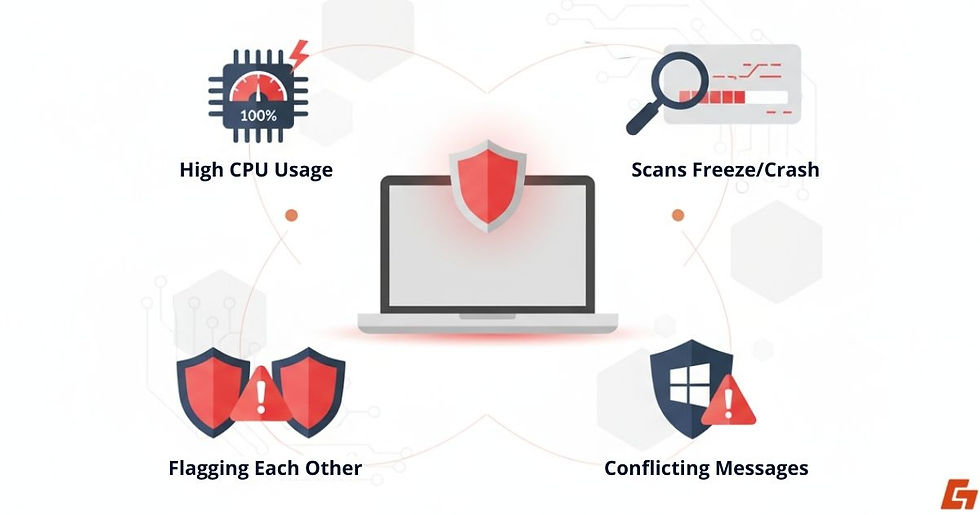
Sign #1: Your CPU Is Constantly Maxed Out
Open Task Manager (Ctrl+Shift+Esc) and check CPU and memory usage. If you see two AV processes eating up resources constantly, something’s off.
Sign #2: Scans That Freeze or Crash Unexpectedly
If one antivirus scan keeps stalling or crashing midway, it might be clashing with another tool trying to scan the same files simultaneously.
Sign #3: When One Antivirus Flags the Other
Seeing the same malware flagged by both programs? That’s not extra protection, it’s double handling. Sometimes they even flag each other, mistaking security processes for suspicious behavior.
Sign #4: Conflicting Messages in Windows Security
On Windows, open the Security Center. If it shows “Multiple antivirus programs are installed” or flags conflicting protection statuses, it’s time to investigate.
This kind of behavior isn’t normal. If you suspect your two antivirus programs are fighting instead of protecting, it's probably time to reconsider your setup.
How to Run Two Antivirus Tools Without Wrecking Your PC
Okay, so you’ve got a strong reason to keep more than one antivirus solution on your system. Maybe one catches things the other misses. Maybe you like the second opinion. That’s fair.

Rule #1: Only One Antivirus Gets to Run in Real-Time
This is the single most important rule. Let one program handle the live protection, and keep the other disabled until needed.
Rule #2: Make Sure They Know to Ignore Each Other
In both antivirus apps, exclude each other's install folders and running processes. This prevents false positives and endless scanning loops.
Rule #3: Don’t Mix Tools That Go Deep Into the System
Some security software digs deep into the same parts of your OS. Mixing them usually ends badly. Look for compatibility notes on the vendor’s site before installing.
Rule #4: Launch the Second Tool Manually, Then Close It
Turn off startup processes or background monitoring for your second AV. Launch it manually when you want to scan, that’s it.
When done right, using two antivirus programs doesn’t have to be a disaster. It’s just a matter of knowing the boundaries and keeping each tool in its lane.
Two Antivirus Programs Usually Spell Trouble
Running two antivirus programs might seem like a smart safety net, but in most cases, it leads to unnecessary headaches, system slowdowns, crashes, and confusing threat alerts. We’ve covered why these conflicts happen, when it’s safe to combine tools, and how to avoid common pitfalls.
Instead of chasing double protection, it’s smarter to build a setup where one strong antivirus handles real-time defense, and a second tool runs only when needed. That way, you're boosting security, not breaking it.
Still thinking about stacking up your defenses? Make sure you’re not trading peace of mind for system chaos.


Comments