

VPN Router Explained: The Gadget Your Wi-Fi Might Be Missing

What if your entire home network was protected by a VPN, automatically, every second you're online?No more switching apps, no more forgotten connections, just seamless, always-on security from the moment you connect.
A VPN router is a Wi-Fi router configured to run a VPN connection at the network level, protecting every device connected to it without needing separate apps.
In an age of smart homes, remote work, and non-stop streaming, securing just one device isn’t enough. From smart TVs to gaming consoles to lightbulbs with Wi-Fi, a VPN router ensures your whole household stays private, no tech juggling required. And once you understand how it works, you might wonder why you didn’t start sooner.
What You Will Learn in This Article
What Is a VPN Router and Why It Might Be the Smartest Tech in Your Home
Let’s break it down without the jargon. A VPN router is simply a Wi-Fi router that’s been set up to run a VPN connection, not just for one device, but for every device that connects to it.

Think of it as putting your whole internet network behind a secure, encrypted tunnel. No need to open up a VPN app on your phone or computer each time. Once it’s set up, the protection is always there, quietly doing its job in the background.
Smart Devices, Dumb Security: Here’s the Fix
Now here’s where it gets interesting: this kind of setup is especially handy for homes filled with gadgets that don’t support VPN apps, like smart TVs, gaming consoles, or even your fridge (yes, those exist now).
If it connects to your Wi-Fi, it gets VPN protection, simple as that.
Who Actually Needs a VPN Router?
People often use VPN routers in households with lots of users, or in work-from-home setups where security isn’t just nice, it’s non-negotiable. It also means you don’t have to micromanage privacy settings across ten different devices. That’s a win, right?
How Does a VPN Router Work Behind the Scenes?
You might be wondering: is this just a fancy router with stickers slapped on? Not quite. The magic happens inside the router’s firmware. This is where your VPN login details, server address, username, protocol, are saved.

Once that’s done, the router knows to encrypt all outgoing traffic and send it through the VPN tunnel, no questions asked.
Everything Looks Normal, But It’s Not
From your perspective? Everything feels normal. Your internet still works, devices still connect like always, but now the entire network is cloaked under the VPN.
That means your ISP can’t peek into what you’re doing, and websites can’t sniff out your true location quite as easily.
One Tunnel to Rule Them All
And here’s a fun twist: the VPN on the router covers everything by default. Whether you’re watching Netflix on a smart TV or downloading files on a laptop, all that data takes the same protected route.
Think of it like a bodyguard standing at your front door, nothing gets in or out without going through them first.
Is Your Router Compatible? A Quick Check
Still, it’s not magic. The router must support VPN protocols like OpenVPN or WireGuard, and you’ll need to follow your provider’s setup steps carefully. But once it’s running, you barely need to touch it again.
VPN Router Benefits You’ll Actually Notice
You know how annoying it is to forget to turn on your VPN? With a VPN router, that’s no longer your problem. The protection is always on, whether it’s you, your kids, your roommate, or that friend who “just needs the Wi-Fi real quick.”

Always-On Privacy for Everyone on the Network
Since the VPN runs at the network level, everything connected to your Wi-Fi is automatically protected, no separate logins or apps needed.
It’s a set-it-and-forget-it kind of setup that covers even those tricky devices you can’t install VPN software on (yes, the ones we already mentioned).
One Router, Zero Micromanagement
It’s also incredibly efficient. Instead of managing settings on every device, a single VPN router handles the heavy lifting.
It’s like upgrading from juggling plates to using a conveyor belt, more control with way less chaos.
Customize Your Connection with Split Tunneling
Some routers offer advanced features like split tunneling, letting you pick and choose which devices use the VPN and which don’t.
That’s perfect for digital nomads, remote workers, or anyone who wants their smart TV to pretend it’s in the U.S. while their work laptop keeps a local IP.
VPN Routers Aren’t Perfect: Here’s What You Should Know
Now, let’s be real. A VPN router isn’t all sunshine and secure rainbows. It has some limitations, especially if you're not a tech-savvy user.
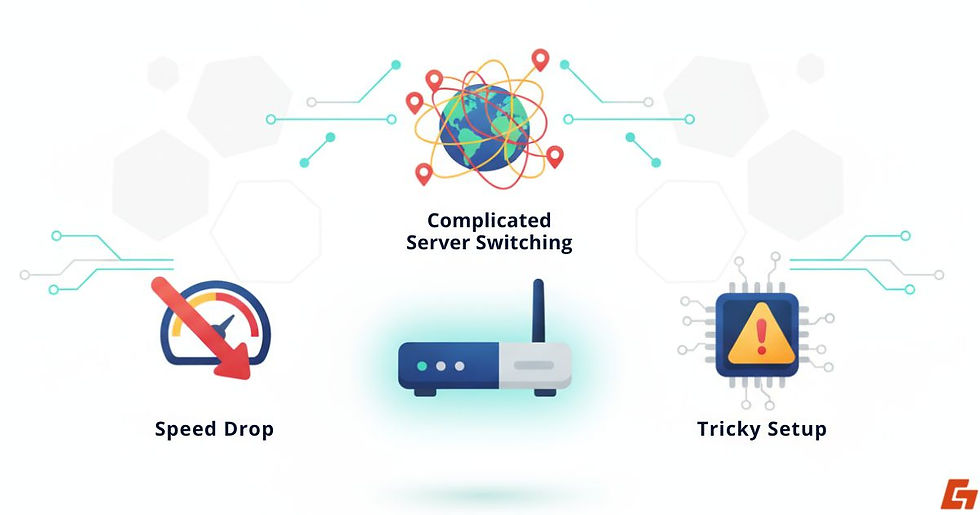
First off, there’s the speed drop. Since your traffic is being encrypted and rerouted, your internet connection might slow down. Not dramatically, but enough to notice, especially if your VPN server is far away or your router isn’t very powerful.
Why Server Switching Gets Complicated
Another hiccup? Switching VPN servers is more complicated than it is on an app. You can’t just tap a button and bounce from New York to London.
You’ll need to log into your router’s settings and manually enter new details. For some, that’s no big deal. For others, it’s a full-blown headache.
Setup Isn’t Always Plug-and-Play
And while we’re at it, setting up a VPN on a router can be tricky. If your router’s firmware doesn’t support VPNs (many cheaper or ISP-provided ones don’t), you’ll need to flash it with custom firmware like DD-WRT or Tomato.
Sounds technical? It is. If that sentence gave you a small panic attack, you’re not alone.
Once It’s Set, It Stays Out of Your Way
That said, once you push past setup and configuration, the ongoing experience is pretty hands-off. But it's important to know what you’re getting into before you buy or tinker.
VPN App vs VPN Router: Which One Fits Your Life Better?
Sometimes, the easiest way to understand a tech tool is to compare it to what you already know. So let’s put a VPN router head-to-head with a regular VPN app.
Feature | VPN App | VPN Router |
Device-level protection | Yes | Yes (for all connected devices) |
Easy to switch servers | Super easy | Not without manual setup |
Works with smart TVs & consoles | Not directly | Absolutely |
Speed control | Per device | Global, affects whole network |
Setup complexity | Very easy | Moderate to advanced |
Use a VPN App If You’re a Solo Browserit
If you're the only person in your household using a VPN and mostly on your laptop or phone, stick with an app. It’s easier, faster to set up, and gives you more control over server switching and device-specific preferences.
Use a VPN Router If You’ve Got a Busy Household
But if you're dealing with lots of devices, or want your entire home covered with VPN protection by default, the VPN router setup is absolutely worth the time.
Especially for families, shared apartments, or anyone who works from home and doesn’t want to worry about whether the VPN is running.
How to Get a VPN Router Without Breaking a Sweat
Alright, so you’ve decided a VPN router is your next upgrade. But how do you actually get one? You’ve got two solid routes (pun intended).
Pre-Configured VPN Routers: Pay More, Stress Less
If you don’t want to mess with firmware, this is the plug-and-play solution. Brands like FlashRouters, InvizBox, and Vilfo sell routers that are already loaded with VPN capabilities.
They’re more expensive than your average router, but they save you time and possibly your sanity.
Flashing Firmware: DIY with the Right Hardware
Already have a router you love? If it’s compatible, you can install custom firmware like DD-WRT, Tomato, or OpenWRT. These give you the control needed to run a VPN client directly on the router.
But let’s be honest, this isn’t for everyone. It takes patience, precision, and a good tutorial (your VPN provider probably offers one).
Make Sure Your VPN Provider Is Router-Ready
Before you go all in, double-check that your VPN provider supports router setups. The best ones, like NordVPN, ExpressVPN, and Surfshark, have detailed guides and even customer support to walk you through the process.
Once you’re set up? You’ve got a VPN router humming along quietly, shielding your entire network while you stream, browse, or work without lifting a finger.
Real-Life Scenarios Where VPN Routers Shine
Let’s not pretend everyone needs a VPN router. But for some people, it makes total sense and then some.

Stream Like You’re Anywhere in the World
Streaming junkies, for starters. If you binge-watch Netflix on a smart TV or Fire Stick, a VPN on the router means your TV is automatically using the VPN without needing a workaround.
That’s especially useful when you’re accessing geo-restricted content or switching locations to unlock new catalogs.
Secure Gaming Without the Lag
Gamers? Same deal. Consoles like PlayStation or Xbox don’t support VPN apps directly, but connect them to a VPN router, and they’re good to go.
No laggy VPN app interface, just clean access with encrypted traffic in the background.
Safe Remote Work from Your Home Hub
Then there are remote workers or digital nomads. If your livelihood depends on secure connections, it’s a relief knowing your entire home or remote hub is covered.
No forgetting to hit the “connect” button before jumping on a Zoom call or uploading sensitive files.
Automatic Privacy for Guests, Kids, and Roommates
And finally, large households. If you’ve got guests, roommates, or kids constantly jumping on the Wi-Fi, a VPN router setup means everyone gets protected, without even realizing it.
Choosing a VPN Provider That Works Well with Routers
Not every VPN plays nicely with routers. So if you’re going this route (yes, pun still intended), make sure your VPN provider checks the right boxes.

Easy Setup Tools & Native Router Apps
This makes life easier, especially if you’re not a networking pro. Some VPNs even offer web-based dashboards for router control, which is a huge bonus.
Must-Have Protocols: OpenVPN and WireGuard
These are the gold standard protocols for VPN router compatibility. They’re fast, secure, and supported by most modern routers and firmware.
Split Tunneling for Selective Privacy
Ideally at the device level, so you can choose which gadgets go through the VPN and which don’t. This is key for balancing privacy and speed.
Kill Switches and Multi-Hop for the Security Nerds
These features give you extra layers of control and protection, especially useful for privacy-focused users or remote work setups.
Unlimited Connections = Unlimited Peace of Mind
Since a VPN router technically counts as one connection, unlimited device support helps you avoid running into restrictions with your provider.
Trusted VPNs That Won’t Let You Down
Providers like ExpressVPN, NordVPN, and ProtonVPN all have strong reputations for VPN router benefits, from user-friendly setup guides to advanced privacy tools.
Just be sure your plan includes router support before committing.
Is a VPN Router the Upgrade You Didn’t Know You Needed?
Setting up a VPN router means your entire network, every device, every user, is protected by default, without daily effort or app juggling. It’s a one-time setup that brings long-term peace of mind, especially for privacy-conscious households or remote work setups.
It changes the way you think about online security: not as a manual task, but as something that just works in the background, quietly and constantly.
So, is it time to stop securing devices one by one and start protecting your whole digital life at the source?


Comments